Smarter Voice Recognition: Unlocking Multi-Wakeword Detection for Efficient, Customized Smart Devices

Invented by Peterson; Michael Thomas, Fu; Gengshen, Challenner; Aaron, Chen; Rong, Jacques; Cody, Bradstreet; Stefan M.
There’s a new patent application in the world of speech recognition that could change how our devices listen and respond to us. If you’ve ever used a voice assistant like Alexa or Google, you know how important it is for these devices to hear the right word at the right time. But what if your device could listen for many different words or sounds, and do it with less strain on its brain? This article takes a deep dive into how this new invention works, why it matters, and what’s different about it. Let’s break it all down.
Background and Market Context
The way we interact with computers has changed a lot. Not long ago, typing and clicking were the only ways to tell our devices what to do. Today, voice assistants like Amazon Alexa, Google Assistant, and Apple Siri let people use their voices to set alarms, play music, get weather updates, and even control smart homes. These voice-driven devices are everywhere—in our homes, cars, phones, and even in our pockets as earbuds.
This change happened because of big improvements in speech recognition. Now, machines can tell what words we say. With even smarter systems, they can understand the meaning behind our words and respond in a helpful way. The heart of these systems is a process called “wakeword detection.” A wakeword is a special word or phrase, like “Alexa” or “Hey Google,” that tells the device to start listening and get ready for a command.
But there’s a problem. As more people use these devices and as companies add more features, the number of wakewords and special sounds that devices need to listen for keeps growing. Some homes have several different voice assistants, and each one needs its own wakeword. Some users want to choose their own wakeword. On top of that, devices now need to listen for other sounds too—like a doorbell ringing, a dog barking, or a smoke alarm.
The market is pushing for more flexibility. People want devices that can switch between different assistants, listen for custom words, or respond to unique sounds. Businesses want devices that can offer different “personalities” or branded experiences—imagine a hotel room device that wakes up to “Hey Marriott,” or a car that listens for “Hey Tesla.” At the same time, privacy is a big concern. People don’t want their devices always listening and sending everything to the cloud.
All this puts a huge load on the small computers inside each device. Each new wakeword or sound needs its own “detector,” which is like a mini-program that listens for just that word or sound. Running many detectors at once eats up memory and processor power. Devices can slow down, use more battery, or even miss the wakeword entirely if they’re overloaded.
So the market needs a way for voice-controlled devices to listen for many different wakewords and sounds at the same time, without becoming slow or needing expensive hardware. This is where the new patent comes in. It offers a clever way to break up the listening process so the heavy work is done once, and only light work is needed for each word or sound. By splitting the job into two parts—a big general “encoder” and lots of small “decoders”—devices can be smarter, faster, and more flexible, all while using less power.
Scientific Rationale and Prior Art

Let’s talk about how speech recognition systems have been working so far, and why the old ways are starting to hit their limits.
In the past, each device would have a special program for each wakeword or sound it wanted to detect. Think of it like a room full of people, each person listening for a single word. Every time you want the device to listen for a new word, you have to add another person to the room. If you want the device to listen for five words, that’s five people. If you want ten words, that’s ten people. As you can imagine, the room gets crowded fast, and things start to slow down.
The main technical reason for this is that each sound detector, or “model,” is big. Each model has been trained to recognize the unique sound shape—the waveform—of its assigned word. Old systems like Hidden Markov Models (HMMs) or Deep Neural Networks (DNNs) would take the incoming audio, process it, and compare it against each model one by one. When you only have one or two wakewords, this works fine. But as you add more, it gets harder for the device to keep up.
Some systems tried to combine all possible wakewords into one big model. This is called a “large vocabulary continuous speech recognition system” (LVCSR). The idea is that instead of many small models, you have one giant model that listens for everything. But this also has problems. The model gets huge, takes up a lot of memory, and slows down the device. Plus, if you want to add a new wakeword, you have to retrain the entire model, which is slow and can be expensive.
Other systems used hybrid setups, combining HMMs for the “filler” sounds (like background noise or other words) and DNNs for the main wakewords. Some used Recurrent Neural Networks (RNNs) or even more advanced deep learning architectures. Each of these methods made things a little better, but the basic problem remained: more wakewords mean more computing work, more memory, and more strain on the device.
Another challenge is “context.” In a busy home, there could be several people each wanting their own wakeword, or a device might need to listen for certain sounds only when a particular app is running. Old systems didn’t handle context well—they were either always on or always off for all sounds, wasting resources or missing important cues.
Finally, privacy and security are key. Users want to make sure their devices only listen for the right sounds, and don’t accidentally activate or send data unless truly needed.
So, the big needs that prior art struggles with are:
- Letting devices listen for many wakewords or sounds at once, without slowing down or draining batteries.
- Making it easy to add or remove wakewords without retraining or reinstalling everything.
- Allowing the device to respond to context—turning on certain detectors only when needed.
- Using less memory and processor power, especially for older or smaller devices.
- Protecting privacy, so devices don’t listen more than necessary.
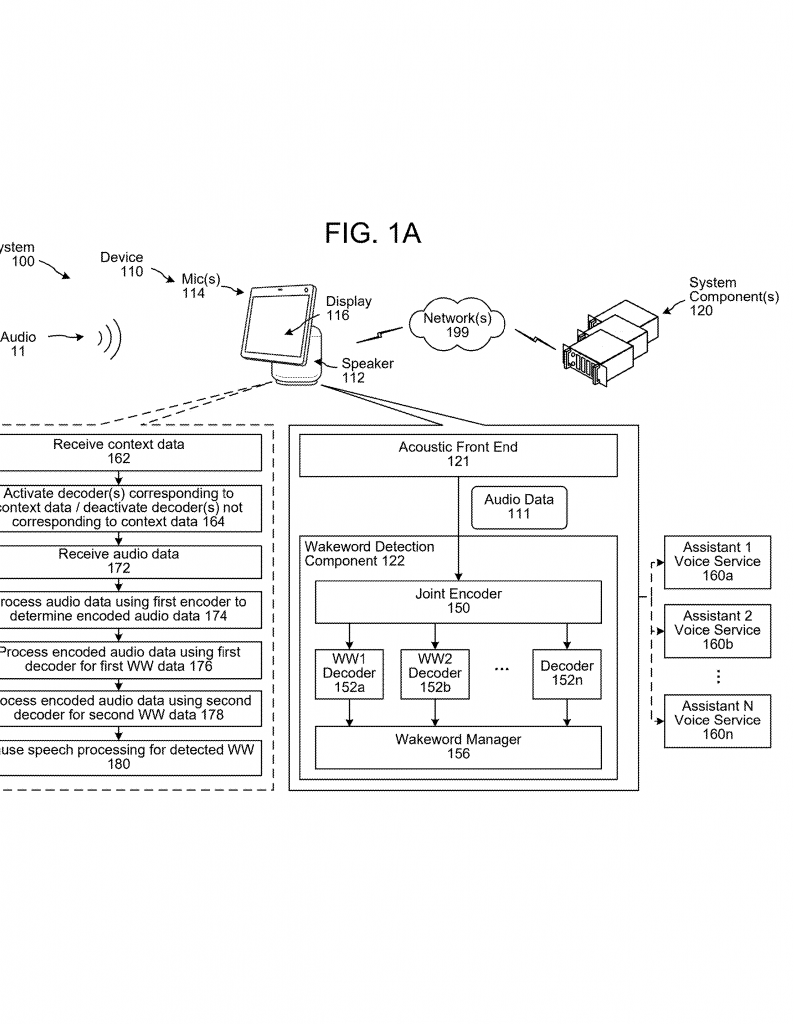
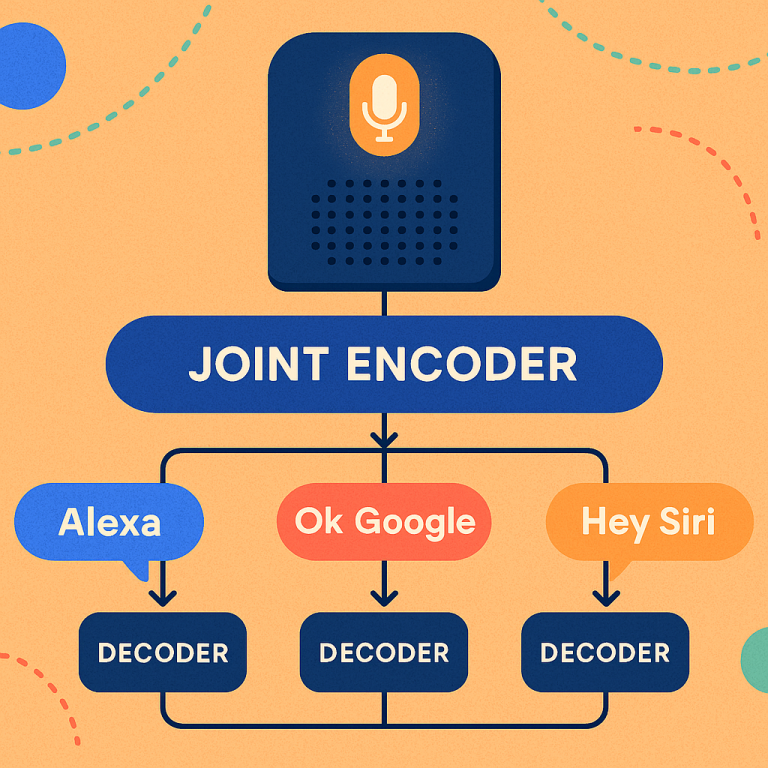
That brings us to the new approach in this patent. Instead of building a separate “listener” for every word, the invention splits the job into two steps. First, a big piece called the “encoder” listens to all the sounds and turns them into a kind of short summary—like a fingerprint for each bit of audio. Then, for each wakeword or sound, there’s a small “decoder” that just looks at these fingerprints and checks if its word or sound is present.
This way, the heavy lifting is done once by the encoder, and each decoder is small and light. You can turn decoders on or off based on the situation, add new ones without retraining the whole system, and save a lot of memory and power.
Invention Description and Key Innovations
Now, let’s get into the details of how the invention works, and what really makes it new and useful.
At its heart, the invention is a method and system for detecting many different “wakewords” or sounds using a two-step process—an encoder and multiple decoders. Here’s how it works, step by step, in plain language.
1. Listening and Summarizing (Encoding):
The device, like a smart speaker, is always listening for sounds. When it hears something, it runs the audio through a big, powerful “encoder.” The encoder is like a super-listener—it doesn’t care about any particular word, but instead breaks the sound into pieces and turns each piece into a special summary called a “feature vector.” These vectors are like short codes that capture the important parts of the sound, like pitch, rhythm, and tone.
2. Checking for Many Words or Sounds (Decoding):
Once the encoder has made these summaries, the device sends them to several tiny “decoders.” Each decoder is trained to look for a specific wakeword or sound (like “Alexa,” “Hey Google,” “doorbell,” or “dog bark”). Decoders are much smaller and simpler than the encoder. They just need to check the summaries to see if their target sound is present. Because they’re small, you can have a lot of them running at once without slowing down the device.
3. Turning Decoders On and Off:
Maybe your device doesn’t always need to listen for every word or sound. The system lets you turn decoders on or off based on the situation. For example, if your device knows you’re the only one home, it can just listen for your personal wakeword. If a certain app is running, it can turn on decoders for app-related commands. This saves power and keeps the device focused.
4. Adding New Sounds Easily:
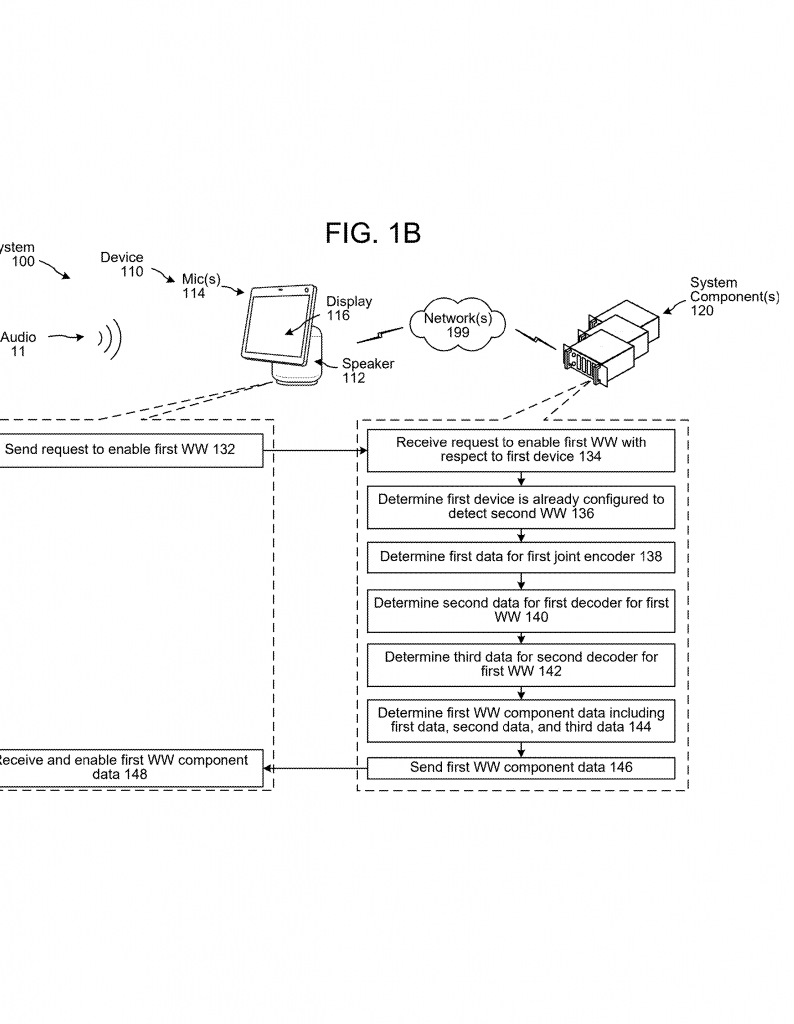
Suppose you want your device to listen for a new word or sound. With the old way, you’d have to retrain the whole system. With this invention, you just train a new decoder for the new word, plug it in, and you’re done. The encoder doesn’t need to change, because it already knows how to summarize any sound.
5. Permission and Privacy:
Each decoder can have its own permissions. One decoder might be allowed to trigger certain actions, while another might have stricter limits. This helps with privacy and security, making sure the device only responds as allowed.
6. Flexible Architecture:
The invention works for wakewords, keywords, and even non-speech sounds—like alarms, beeps, or music. It also works for different types of devices, from smart speakers to headphones, TVs, appliances, and more.
7. Resource Savings:
By doing the heavy work once (in the encoder) and sharing it across many decoders, devices can listen for more sounds without needing more memory or processing power. For example, the encoder might use 1,000,000 operations per second, but each decoder only needs 10,000. Instead of multiplying the heavy cost for every word, you only pay it once.
8. User and Context Awareness:
The system can use information about who is present, what apps are running, or past commands to decide which decoders to run. If it recognizes you (by your voice, phone, or even where you are in the house), it can load your custom wakewords. If you launch a music app, it can load decoders for “pause,” “skip,” or “volume up.”
9. Customization and Speed:
Manufacturers can ship devices with lots of decoders ready to go. If a user wants to enable a new wakeword, it can be activated instantly without waiting for a new software update. Disabling a decoder is just as easy.
10. Multi-Assistant Support:
With this setup, a single device can listen for wakewords for multiple assistants—“Alexa,” “Hey Google,” “Hey Siri,” and so on. Each word can be routed to its own service. If you want to pretend your assistant is a celebrity, you can add a decoder for “Hey Oprah” or “Hey Shaq.”
11. Smart Grouping:
If several devices are in the same room, they can coordinate so only one device is responsible for certain wakewords, reducing unnecessary work and crosstalk.
12. Detailed Technical Implementation:
The encoder can be built using deep learning models like convolutional neural networks (CNNs) or recurrent neural networks (RNNs). It can process audio in small time frames, creating a sliding window of features. The decoders can be small neural networks, state machines, or other types of pattern matchers. Each is tuned for its assigned sound.
13. Activation by Context Data:
Context data can come from user profiles, device settings, sensor data (like motion or presence), app status, or even network state. For example, if the network goes down, certain decoders can be activated to keep key features running offline.
14. Manager Components:
A central “manager” watches the output of all decoders. If a decoder signals a match (like a wakeword detected), the manager triggers the right action—starting speech recognition, sending data to the cloud, or running a local command.
15. Extensible for New Uses:
The same framework can be used for more than just wakewords. It can detect acoustic events, recognize music, filter out the device’s own voice, or help with user identification.
In summary, this invention is about being smart with resources. Instead of having every detector do all the work from the ground up, one powerful encoder does the heavy lifting just once, and each decoder does a bit of light work. This allows devices to listen for many different sounds at once, add or remove new sounds quickly, adapt to the user and context, and do it all without draining the battery or slowing down.
Conclusion
The new patent application offers a big step forward for speech-controlled devices. By splitting sound detection into an encoder and many decoders, devices can be more flexible, faster, and more efficient. They can listen for more sounds, offer more features, and still run smoothly—even on older or smaller hardware. For users, this means more choices, more privacy, and better performance. For developers and device makers, it means easier updates, less strain on devices, and a path to new experiences and business models. As our homes, cars, and gadgets get smarter, inventions like this will help make sure they can listen—and respond—the way we want them to.
Click here https://ppubs.uspto.gov/pubwebapp/ and search 20250363989.